Sync between your Macs
Keep the same tasks on your work and personal Macs, with no iCloud or account. Pair with a code; every change is end-to-end encrypted.
Settings → Your other Macs keeps your tasks the same across Macs, say a work laptop and a personal one, even if your work Mac can't sign in to iCloud. You don't need an account, and every change is encrypted on your Mac before it goes anywhere.
Pair two Macs
- On one Mac, choose Show a code on this Mac. You'll see a code like
K7MX-4QRB, which lasts for 10 minutes. - On the other Mac, choose I have a code, type it in and click Join.
- Both Macs now show six digits. Check that they match, then click They match on both.
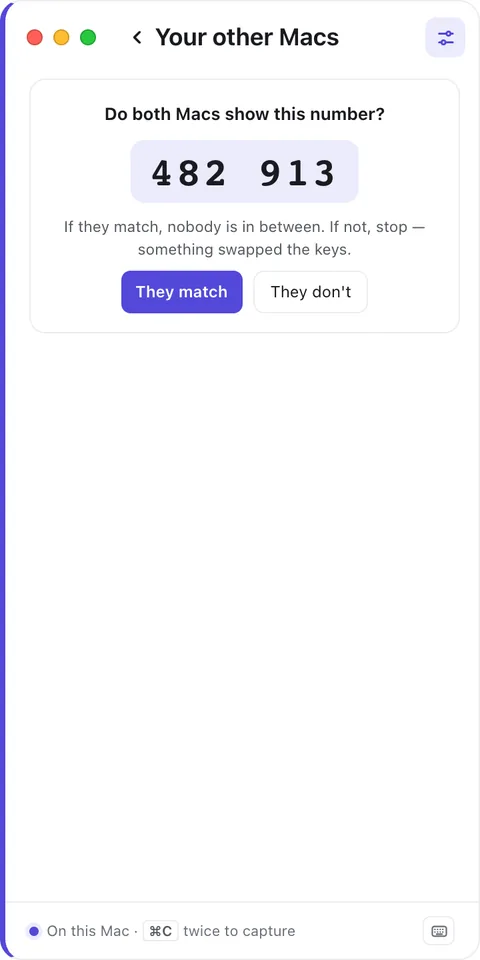
Those six digits are how you know nothing got in between your Macs. If they're different, click They don't and pair again.
To add more Macs, do the same thing with + Add a Mac.
How it syncs
- While both Macs are open, changes on one show up on the other within about 30 seconds.
- If a Mac was asleep or offline, it catches up within a minute of coming back.
- If a Mac has been away for more than 30 days, it asks the others for a full copy when it returns.
- Edited on two Macs at once? Each detail keeps whichever edit is newest. So if you rename a task on one Mac and tick it off on the other, both changes stick.
- The card shows Up to date and when it last synced, or how many changes are still waiting to send. Sync now syncs straight away.
Keep a project on one Mac
Under Keep on this Mac only, you can switch on any project you want to keep to this Mac, like a personal project on your work Mac. Its tasks stay here and are removed from your other Macs.
Projects you keep on one Mac also stay out of Todoist and Apple Calendar.
What stays per Mac
- Your mode, so it can be Work on the work laptop and Personal at home.
- Notifications and snoozes.
- Links to Apple Reminders.
How it stays private
Your Macs share a key that's created on your Mac and kept in your Keychain. It's only ever handed over during pairing, sealed with a secret the two Macs work out together. Every change is locked with that key (ChaCha20-Poly1305) before it leaves your Mac.
Between your Macs sits a small relay. It holds the sealed boxes until your other Macs collect them, then deletes them, after 30 days at the latest. The relay never has the key, so it can't read your task titles, notes, projects or Mac names. It keeps no logs, and there's no account behind it.
Private by default
Sync between your Macs is end-to-end encrypted. The key exists only on your Macs, in the Keychain.
Stop syncing
- Remove… takes another Mac off the list.
- Turn off sync on this Mac… stops syncing here. This Mac keeps its tasks, and your other Macs keep theirs.
Lost a Mac? Turn sync off on your other Macs and pair them again. That creates a new key, which the lost Mac won't have.