Todoist
Bring your Todoist into TodoCity and keep the two in sync, both ways by default. Edit, add, finish or delete in either app and the other follows.
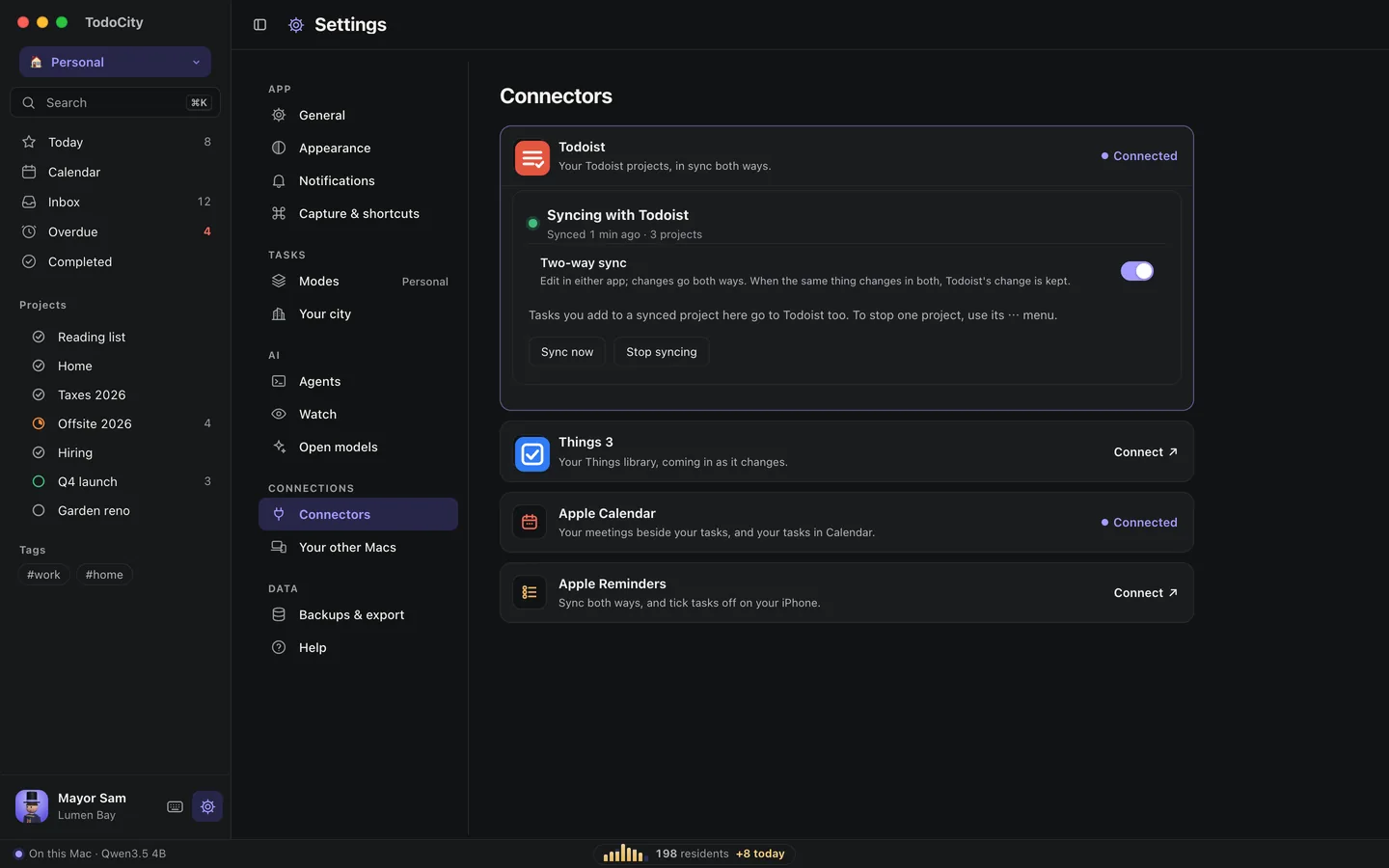
Settings → Connectors → Todoist brings your Todoist into TodoCity and keeps the two in sync, in both directions. You can carry on using Todoist on your phone or with your team, and use TodoCity on your Mac.
Connect with your API token
- Copy your API token from Todoist. In Todoist, on the web or in the app, open Settings → Integrations → Developer and click Copy API token.
- Paste it into TodoCity and click Connect. TodoCity reads your projects, sections, tasks, sub-tasks, labels, comments and completed tasks directly from Todoist's servers onto your Mac. For big accounts, this takes a minute while completed tasks come in, one year at a time.
- Check the preview. Untick any projects you'd rather leave behind, and decide whether to Bring completed tasks.
- Keep in sync, which is on unless you turn it off. TodoCity and Todoist then catch up with each other every few minutes, both ways.
- Click Import. TodoCity makes a backup of itself first, in Settings → Backups & export, marked before import.
If you run it again later, it only brings in tasks that are new since last time.
With Keep in sync on, your token is stored in the macOS Keychain and deleted when you stop syncing. With it off, TodoCity uses the token once and then forgets it.
No token? Use CSV files
- Export each project from Todoist with ⋯ → Export as CSV. If you're on Todoist Pro, you can download a backup from Settings → Backups and unzip it instead.
- In TodoCity, choose No token? Use CSV files instead.
- Click Choose CSV files… and select all the .csv files at once.
CSV files only include your open tasks. If you want your completed tasks too, connect with a token.
Two-way sync
Two-way sync is on from the start, so you can work in either app and your changes show up in the other. That covers changing a task, adding one to a synced project, finishing it or deleting it.
What goes back to Todoist
When you change a synced task in TodoCity, these details go back to Todoist:
- title
- notes
- day and time
- repeat
- deadline
- priority
- project and section
- done
- deleted
A few things stay as they are in Todoist: sub-tasks, Someday and This Evening.
When both apps change the same thing
TodoCity compares each detail separately. If the same detail changed in both apps since the last sync, Todoist's change wins. If each app changed a different detail, both changes stick.
What stays on your Mac
- New tasks in your TodoCity Inbox stay in TodoCity.
- New tasks in projects that you started in TodoCity stay in TodoCity.
- Projects set to Keep on this Mac only (in Settings → Your other Macs) don't send anything.
Any new task you add to a project that syncs with Todoist goes to Todoist as well. If you move a synced task into a project that doesn't sync, that task stops syncing, and Todoist keeps its own copy.
Prefer one-way?
Turn off Two-way sync on Todoist's card. Todoist's changes will keep coming in, but your edits in TodoCity will stay in TodoCity. Either way, you can still edit synced tasks.
Stop syncing
- For one project, open its ⋯ menu in the sidebar and choose Stop syncing. Its tasks stay in TodoCity.
- For all of Todoist, click Stop syncing on Todoist's card in Settings → Connectors.
Either way, your tasks stay in both apps. If you want to sync right now, click Sync now on the card.
The safety brake on deletes
If a single sync would delete more than 20 tasks, and that's also more than half of all the tasks linked between the two apps, TodoCity holds back the whole batch and deletes nothing that time. This works in both directions, so a slip in one app can't wipe out the other.
Once you delete a task in TodoCity, it stays deleted. It won't come back from Todoist.
Two Macs
Both of your Macs can keep Todoist in sync. Some changes, like adding a task or finishing a repeating one, wouldn't be safe to send twice. So when one of those arrives from your other Mac, this Mac waits 10 minutes, giving the Mac that made the change time to send it to Todoist first. Edits and deletes go through straight away.
Whenever TodoCity sends a new task to Todoist, it adds a short todocity://task/… line to the description. That's how your other Mac recognizes the task and links to it rather than adding it a second time.
Repeating tasks only move on once in both apps, even with two Macs.
What goes where
| Todoist | TodoCity |
|---|---|
| Project (and sub-projects) | Project |
| Inbox | Tasks with no project |
| Section | Section |
| Task | Task |
| Sub-tasks, any depth | Sub-tasks |
| Labels | #tags on the task |
| Priority 1–3 | Priority P1–P3 |
| Description and comments | Notes |
| Date and time, deadline | Day and time, deadline |
| Recurring date | The same repeat if it's daily, weekdays, weekly, every 2 weeks, monthly or yearly. Custom repeats come over once, with a note so you can pick a repeat |
| Completed tasks | Done tasks (with a token) |
Deleted tasks stay behind. Archived projects only bring their completed tasks.
Private by default
With Keep in sync on, TodoCity reads your Todoist using your token. With two-way sync, it also sends changes to synced tasks back to Todoist's servers. Tasks in your TodoCity Inbox, in projects that don't sync with Todoist and in Keep on this Mac only projects stay on your Mac.
If you need help with the token, see Troubleshooting.