Dates and times
How plain words become a day, a time, a deadline and a repeat. Code on your Mac works out every date, and asks when a phrase fits two days.
Write dates the way you'd say them out loud. Phrases like “by Friday 3pm”, “tomorrow evening” and “every Sunday” turn into a real day, time, deadline or repeat, whether you're capturing text or typing a task.
Code works out the date, not the AI
When you capture text, the model's only job with dates is to copy out the phrase it finds, like “by Friday 3pm”. Code on your Mac then turns that phrase into a day, a time and a repeat, counting from today's actual date. That way, the same words always give you the same answer.
Tasks you type yourself, in Quick Add or the app's add field, go through the same code, without any model at all.
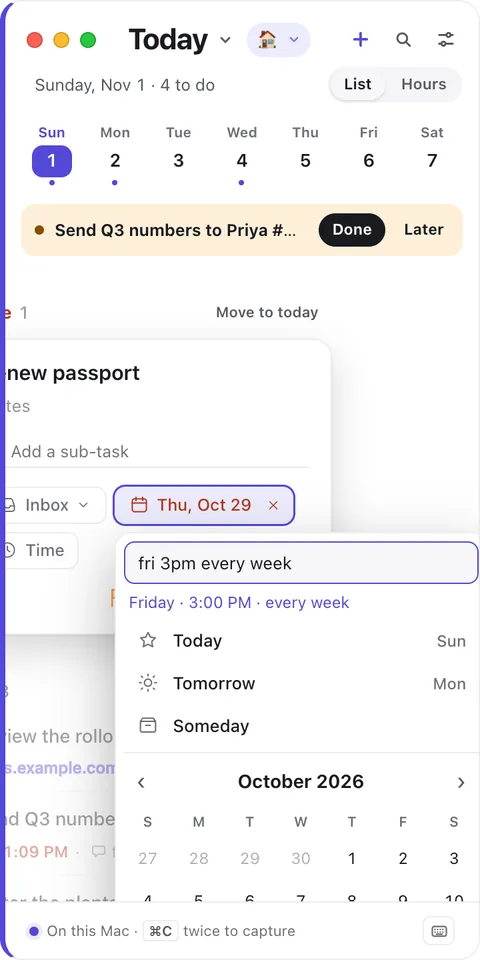
Days
| You write | TodoCity reads |
|---|---|
| today, tonight, tomorrow, the day after tomorrow | That day |
| in 3 days, in two weeks, in 3 business days | Counted from today |
| friday, this friday | The coming Friday |
| next friday | Friday of next week, with this week's Friday offered too if it hasn't passed yet |
| friday next week | Friday of next week |
| end of the week, eow | Friday of this week |
| next week | Monday of next week |
| end of next week | Friday of next week |
| the weekend | The coming Saturday |
| end of the month, eom | The last day of this month |
| next month | The 1st of next month |
| oct 20, 20 october, 10/20 | That date (the next time it comes round) |
For numeric dates like 3/4, your Mac's region decides which number is the month.
Times
| You write | Time |
|---|---|
| 3pm, 3:30pm, 15:30, 9:07 | That time, to the minute. A time on its own means today if it's still ahead, or tomorrow if it's passed |
| at 5 | 5:00 PM (any hour from 1 to 7 is read as afternoon) |
| noon, midday, lunchtime | 12:00 PM |
| eod, end of day, close of business | 5:00 PM |
| morning | 9:00 AM |
| afternoon | 2:00 PM |
| evening | 6:00 PM |
| tonight | 8:00 PM today |
Deadlines
A phrase starting with by, before, due, no later than, until or deadline sets a deadline, meaning the day the task has to be done by. So “by Friday” gives the task a Friday deadline, and when Friday comes, the task shows up in Today even if you'd planned it for later. See Tasks.
Repeats
| You write | Repeat |
|---|---|
| every day, daily, every morning | Every day |
| every weekday, weekdays | Monday to Friday |
| every week, weekly, every monday | Every week |
| every other week, every 2 weeks, biweekly | Every 2 weeks |
| every month, monthly | Every month |
| every year, yearly, annually | Every year |
| every 3 days | Every 3 days |
| every mon and wed | Every week on Monday and Wednesday |
| every other tuesday | Every 2 weeks on Tuesday |
| the 15th of every month | Monthly, on the 15th |
| the 2nd tuesday of the month | Monthly, on the 2nd Tuesday |
| the last day of every month | Monthly, on the last day |
| every weekday until dec 18 | Monday to Friday, ending December 18 |
You'll find more ways to repeat, including counting from when you finish, in Repeats.
Length, priority and tags
When you add a task in the app (with Add Task, or A in a list), a few extra words can set more details:
- @Name puts it in that project.
- for 30 min, for 1h30 or for half an hour sets how long it takes. This only works after “for”, so “call in 30 min” is still read as a time.
- p1, p2 or p3 sets the priority to P1 (urgent), P2 (high) or P3 (medium).
- #home, #work and so on add tags.
Stand-up tomorrow 9:07 for 7 min p2 #work
When a phrase fits two days
Rather than guess, TodoCity asks. If you say “next Friday” on a Tuesday, you might mean this week's Friday or next week's. And 3/4 could be March 4 or April 3. The capture card shows you both options so you can pick the one you meant. See Review a capture.