Blog
Why TodoCity is the best to-do app for 2027
I built TodoCity, so read the headline as a founder's opinion. I've also used Todoist and Things 3 for years, and I think the facts back me up. In 2027 the best to-do app is the one that catches tasks where they show up, keeps them private, and makes finishing them feel good. That's TodoCity.
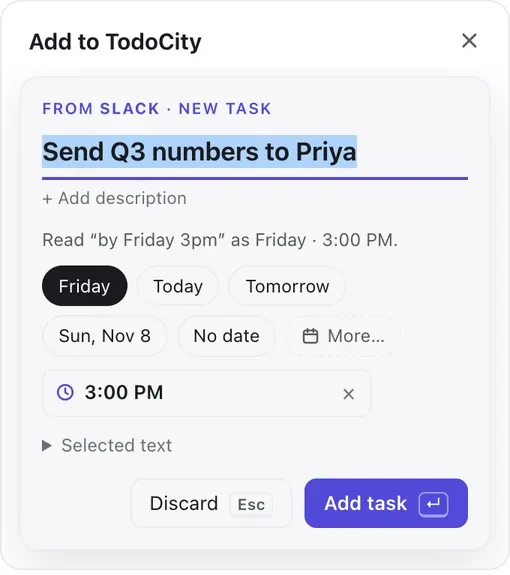
Most of our tasks don't start in a to-do app anymore. They start in a Slack thread, an email, a doc or a PR comment, and the classic apps want you to retype that sentence into a box. In TodoCity you copy the sentence and press ⌘C once more. A small AI model running on your Mac turns it into a dated task, and the text never leaves your laptop.
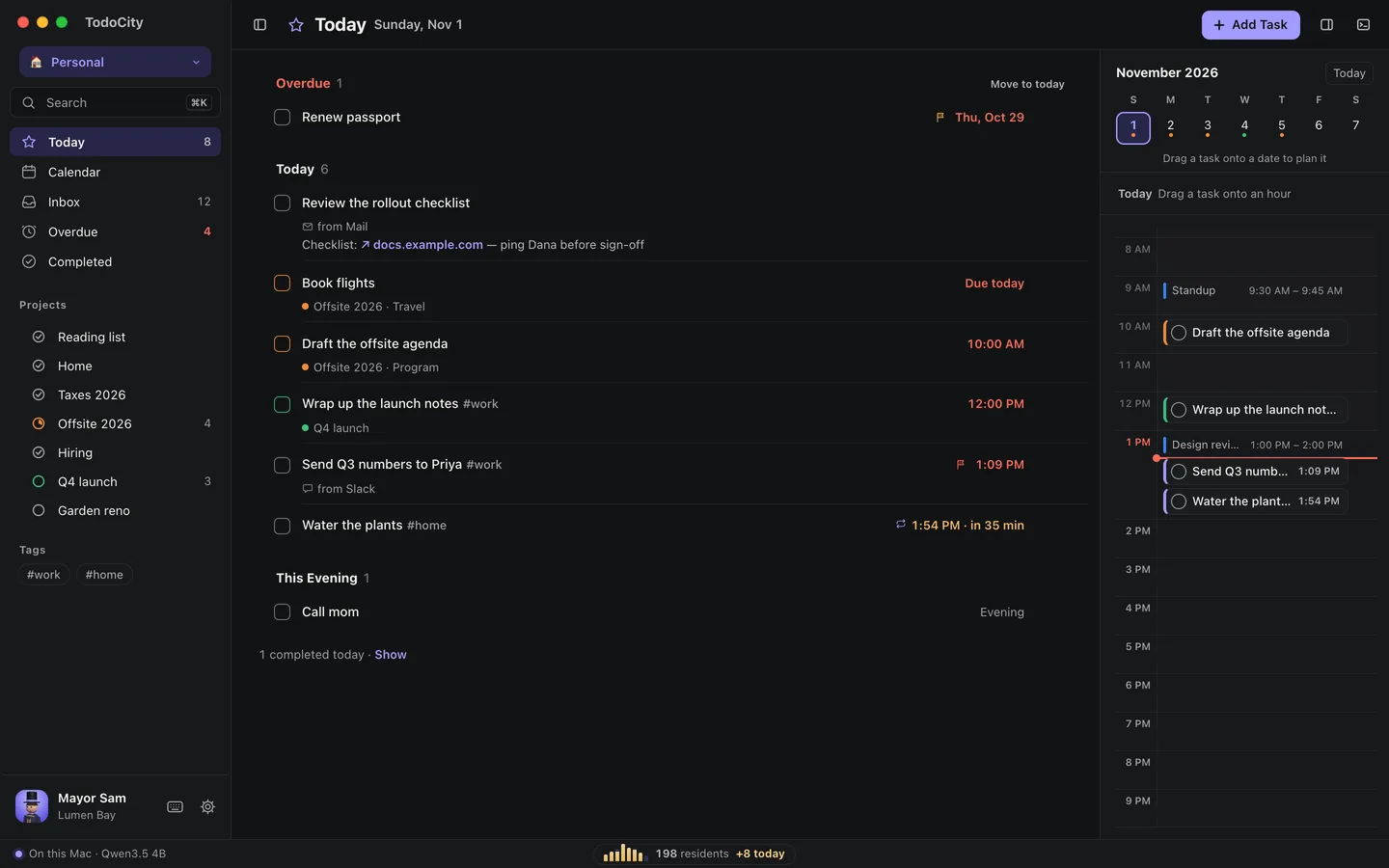
What TodoCity is
TodoCity is a free, open-source (MIT) Mac app that turns any text into a private, dated task. It's built around three ideas.
- Capture from anywhere. Copy text in any app and press ⌘C again, or select it and press ⇧⌘S. The task lands in your list without any pasting or switching windows.
- AI that stays on your Mac. A small language model runs locally and pulls out the action and the date, so "send comments by Friday" becomes a task due Friday. If the date is unclear, it asks you. TodoCity downloads its model once the first time you open it, and there's nothing else to install.
- A city that grows with your work. Every project is an apartment building and every task is a home. Finish a task and its window lights up. Finish a project and the whole building glows. As your population (tasks done) grows, the city adds street lamps, a park, a train line, a harbour and more.
It's a native Mac app with local SQLite storage, signed and notarized by Apple. It runs on macOS 11 or later, on Apple silicon and Intel.
TodoCity vs Todoist vs Things 3
Of the three, only TodoCity turns copied text from any app into a task, runs its AI entirely on your machine, and costs nothing.
| Feature | TodoCity | Todoist | Things 3 |
|---|---|---|---|
| Price (USD) | Free, open source (MIT) | Free plan (5 projects); Pro $60/yr or $7/mo | $49.99 Mac, $9.99 iPhone, $19.99 iPad, one-time each |
| Capture | ⌘C twice in any app, or one shortcut | Quick Add box, Ramble voice (Pro), integrations | Quick Entry box from any app |
| AI | Local model on your Mac | Cloud AI Task Assist (Pro) | None built in |
| Where your tasks live | Your Mac, local SQLite | Todoist's cloud | Your Apple devices + Things Cloud |
| Dates from plain text | Read by the model, confirmed when unclear | Natural-language Quick Add | Natural-language dates |
| Motivation | Living city, milestones, landmarks | Productivity stats | Calm, minimal design |
| Works with the others | Two-way Todoist sync; Things 3 flows in | Many integrations | Apple Shortcuts |
| Platforms | macOS | Web, Mac, Windows, iOS, Android | Mac, iPhone, iPad, Apple Watch, Vision Pro |
| Open source | Yes | No | No |
Competitor prices are as of July 2026 (sources below). Check their official pages before you buy.
Where TodoCity is better
Capture. Todoist and Things both have excellent quick-entry boxes, but you still type the task yourself. In TodoCity, the sentence your teammate already wrote becomes the task. It takes one keystroke and about a second, and then you're back in Slack.
Privacy. Todoist's AI features run in the cloud and need a paid plan. Things 3 has no AI. TodoCity's assistant runs on your laptop and never sends a word anywhere else. If you handle client work, code or anything under NDA, that can decide whether you use AI for your tasks at all. AI agents like Claude Code and Cursor can add tasks through TodoCity's built-in MCP server, and by default they can only add, never read. Full access is there if you choose to turn it on.
Motivation without nagging. Streak counters and red badges punish you for a bad day. TodoCity gives you lit windows, a growing skyline and a new landmark at each population milestone, and it never takes anything away. It feels more like tending a garden than playing a slot machine.

Price. Todoist Pro costs $60 a year, and a full Things 3 setup is about $80. TodoCity is free. It's MIT-licensed, so the code is on GitHub for anyone to read, audit or improve.
What Todoist and Things 3 do well
Both are great apps, and TodoCity is built to work alongside them, so you don't have to switch overnight.
Todoist is the best cross-platform option. It runs on web, Windows, Android and iOS, and it has deep integrations and shared team projects. If your team lives in Todoist, keep it.
Things 3 is the most beautiful task manager on Apple devices. Its Today view and Quick Entry are about as calm and fast as task management gets, and you pay once.
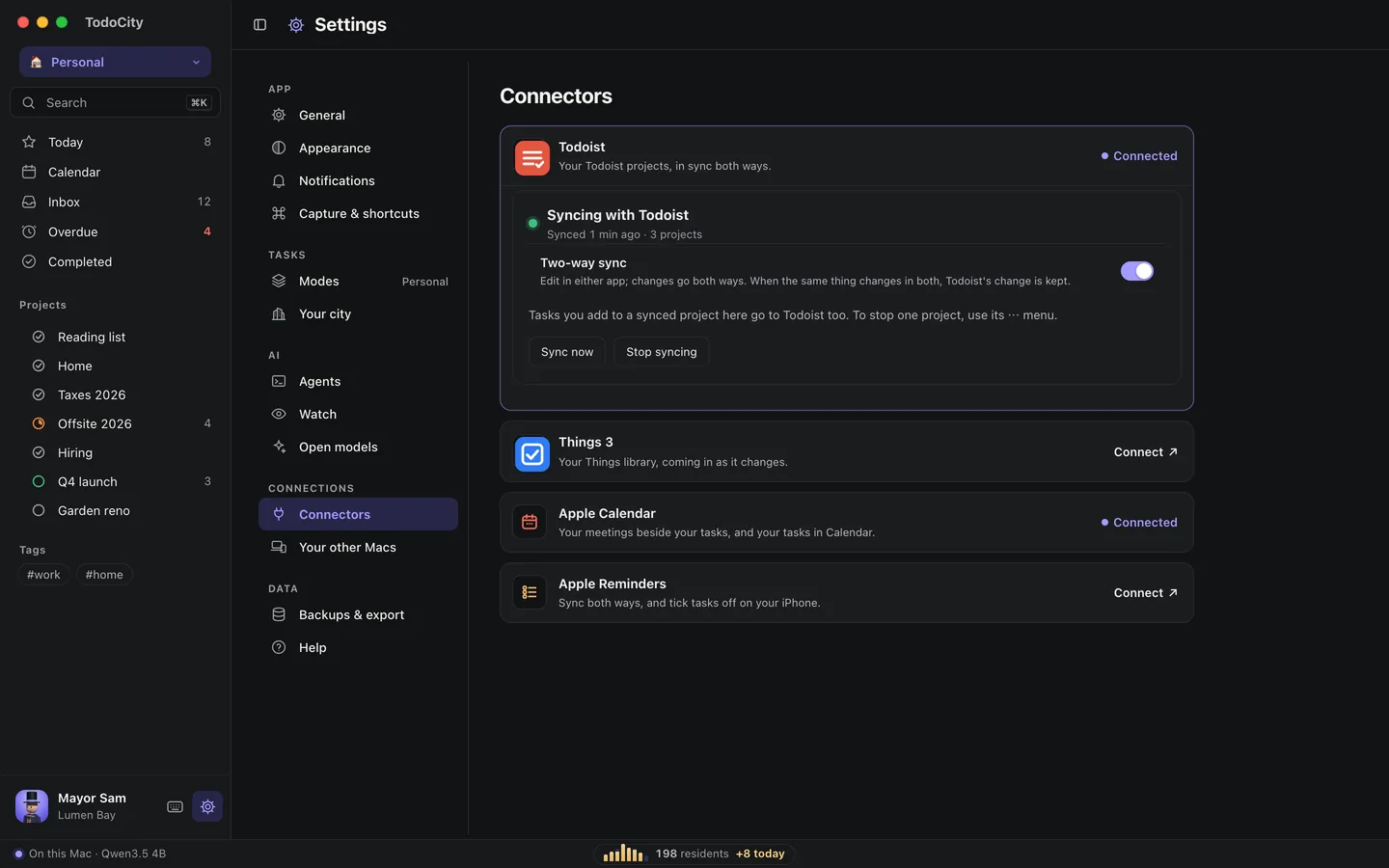
TodoCity syncs with Todoist both ways. You pick which projects sync, one at a time, so private work stays private. Your Things 3 library flows in too. I expect a lot of people will use TodoCity to capture private tasks on their work Mac and keep their current app for everything else.
Who should try it
TodoCity is a good fit if:
- your tasks arrive in Slack, email and docs, and they get lost when you retype them
- you want AI help with your to-dos, but your work can't go to someone else's cloud
- you'd rather watch a city light up than stare at a red overdue count
- you're a developer who likes tools you can read, fork and trust
Download TodoCity free, browse the code on GitHub, and show us your city on r/TodoCity. For side-by-side details, see TodoCity vs Todoist and TodoCity vs Things 3.
Sources
- Todoist Pricing in 2026, Carly, July 2026
- Things 3 Review (2026), Asian Efficiency, July 2026
Screenshots are from TodoCity on macOS, with sample projects.